AIIMS CRE 2026 Typing Requirements
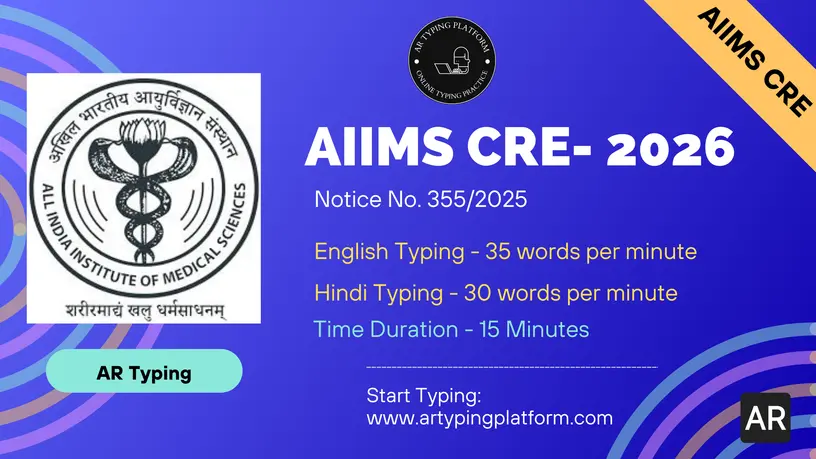
• LDC/UDC/JAA/SAA: 35 WPM English (2625 keystrokes) or 30 WPM Hindi (2250 keystrokes)
• DEO Grade A: English Typing Only (minimum 2000 keystrokes)
• Time Duration: 15 Minutes
• Interface: No word highlighting, no error highlighting, no auto-scrolling. Backspace allowed.
Practice AIIMS CRE Typing Format Online
• Real Exam Simulation: English and Hindi typing tests strictly according to AIIMS guidelines.
AIIMS regularly releases notifications for the Common Recruitment Examination (CRE) for vacancies in various Group B and Group C positions. Some of these positions, including Data Entry Operator (DEO) Grade A, Junior Administrative Assistant (JAA), Lower Division Clerk (LDC), Senior Administrative Assistant (SAA), and Upper Division Clerk (UDC), require a rigorous typing skill test.
AIIMS CRE Typing Speed & Rules
- Typing Language: Candidates can choose to type either in English or in Hindi for most posts. However, for the Data Entry Operator (DEO) post, only English typing is allowed.
- Typing Font (Hindi): For Hindi typing, the Mangal Inscript Keyboard layout is officially used. However, some AIIMS branches may also prefer Kruti Dev 010 font. Be prepared for both layouts.
- Typing Speed: 35 w.p.m for English typing and 30 w.p.m for Hindi typing.
- Time Duration: 15 minutes.
- Passage Length: Minimum 2625 Keystrokes in English and minimum 2250 keystrokes in Hindi. For the DEO post, a minimum of 2000 keystrokes in English is required.
| Posts | Typing Speed Required | Min. Keystrokes | Time Duration |
|---|---|---|---|
| LDC, UDC, JAA, SAA (English) | 35 WPM | 2625 Keystrokes | 15 minutes |
| LDC, UDC, JAA, SAA (Hindi) | 30 WPM | 2250 Keystrokes | 15 minutes |
| Data Entry Operator (DEO) | - | 2000 Keystrokes (English) | 15 minutes |
AIIMS CRE Typing Interface Features:
The typing passage will be displayed at the top of the screen, while the designated typing area will be located directly below it.
Earlier in AIIMS typing exams, features like Word Highlighting, Error Highlighting, and Auto-Scrolling were enabled. However, during recent AIIMS CRE exams, all these features were disabled. Therefore, AR Typing Platform strongly suggests practicing without any assistance features.
The backspace key is fully enabled, allowing candidates to correct any errors at any time during the typing test.
To qualify, a candidate must have typed a minimum of 2625 keystrokes in English or 2250 keystrokes in Hindi. Failing to do so will result in an "Insufficient Attempt" remark.
AIIMS CRE Typing Test Error Evaluation (Mathematical Formula)
Error evaluation will only be performed after you type the minimum required keystrokes (2625 in English or 2250 in Hindi). If you fail to type the minimum keystrokes, your attempt will be marked as Insufficient Attempt and will not be evaluated further.
Step 1: Calculate Total Mistakes
Each Half Mistake contributes to 0.5 of a Full Mistake.
Total_Mistakes = Full_Mistakes + (Half_Mistakes / 2)Step 2: Calculate Penalty
For each mistake word, a penalty of 50 strokes/characters or 10 words (5 strokes = 1 word) is applied.
Penalty = 50 * Total_MistakesStep 3: Calculate Gross & Net Speed
Gross_Speed = Total_Keystrokes_Typed / (5 * 15)Net_Speed = (Total_Keystrokes_Typed - Penalty) / (5 * 15)
Accuracy Percentage (%)
Important- There is no specific error relaxation mentioned in the official AIIMS CRE notification.
- However, according to previous instructions, candidates must maintain a high level of accuracy percentage to make it to the merit list.
- Accuracy Percentage(%) = (Net Speed / Gross Speed) * 100
Typing Thumb Rule:
Candidates are strongly advised to practice regularly for the AIIMS CRE typing tests in order to achieve a high level of accuracy, which is crucial for securing a top position on the merit list. Consistent practice not only helps improve accuracy but also enhances typing speed, increasing the likelihood of achieving a higher score and significantly boosting chances of selection.
Benefits of Using AR Typing Platform
- AR Typing offers a platform for practicing English & Hindi Typing, featuring a real exam-based typing interface.
- Each student receives a Performance Dashboard to monitor and analyze their real-time performance, following the official AIIMS CRE typing error calculation methods and the 50-stroke penalty rule.
- Familiarize yourself with the exact Mangal Inscript and Kruti Dev keyboard layouts used in the exam.
Frequently Asked Questions (FAQs) - AIIMS CRE Typing Test
1. What is the typing speed required for AIIMS CRE LDC, UDC, and JAA?
Candidates must type at 35 words per minute in English or 30 words per minute in Hindi.
2. What is the required typing speed for AIIMS CRE Data Entry Operator (DEO)?
For Data Entry Operators, the requirement is a minimum of 2000 keystrokes in English in the 15-minute test.
3. Is backspace allowed during the AIIMS CRE typing test?
Yes, the backspace key is fully enabled. You can easily correct mistakes during the test.
4. Are there highlighting and auto-scrolling features in AIIMS CRE Typing?
No, although earlier exams had them, recent AIIMS CRE tests have disabled word highlighting, error highlighting, and auto-scrolling.
5. How are mistakes calculated in the AIIMS CRE typing test?
Evaluation is based on Full and Half Mistakes. For every mistake, a penalty of 50 strokes (or 10 words) is deducted from your total keystrokes typed.